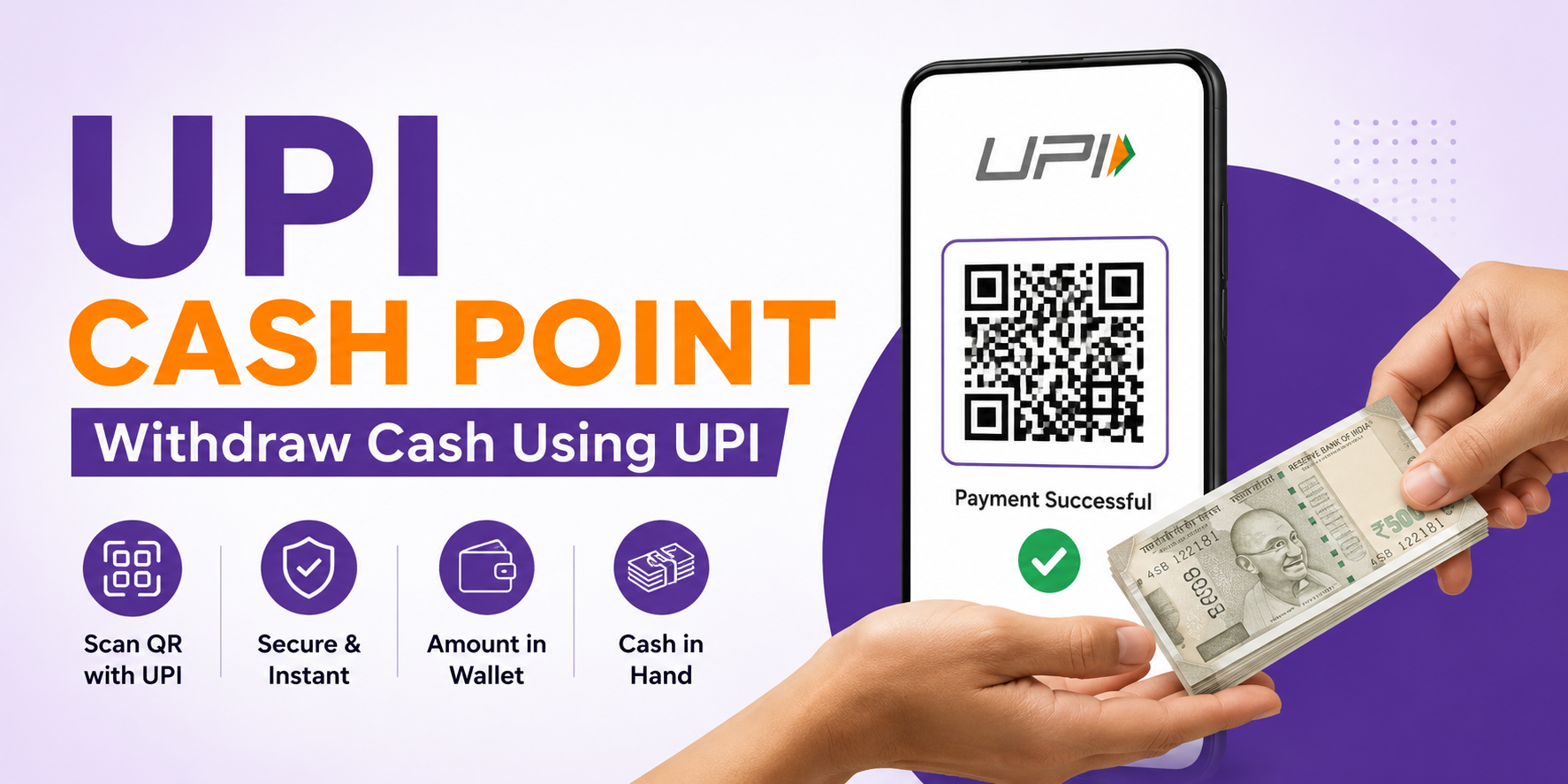
Ezeepay UPI Cash Point: Complete Guide to Cash Withdrawal Using UPI
India’s digital payment ecosystem has transformed the way people transact. While UPI has made payments seamless and instant, many customers still require physical cash for daily expenses. To bridge this gap, Ezeepay offers an innovative service called UPI Cash Point, allowing customers to withdraw cash through UPI payments without visiting an ATM.
For retailers, UPI Cash Point creates an additional source of income through commission earnings, while customers enjoy quick and convenient cash access. In this comprehensive guide, we will explain how Ezeepay UPI Cash Point works, supported banks and UPI apps, retailer commissions, activation process, important do’s and don’ts, and frequently asked questions.
What is UPI Cash Point?
This Cash Point is a cash withdrawal service that enables customers to receive cash from a retailer by making a UPI payment through a dynamic QR code.
Instead of visiting an ATM, customers simply scan a QR code generated through the Ezeepay app, complete the payment, and receive cash instantly from the retailer.
Transaction Flow
Customer Pays via UPI → Retailer Receives Amount in Ezeepay Wallet → Customer Gets Cash
This service is particularly useful in rural and semi-urban areas where ATM availability may be limited.
How to Withdraw Cash Using Ezeepay UPI Cash Point?
The process is simple, secure, and takes only a few minutes.
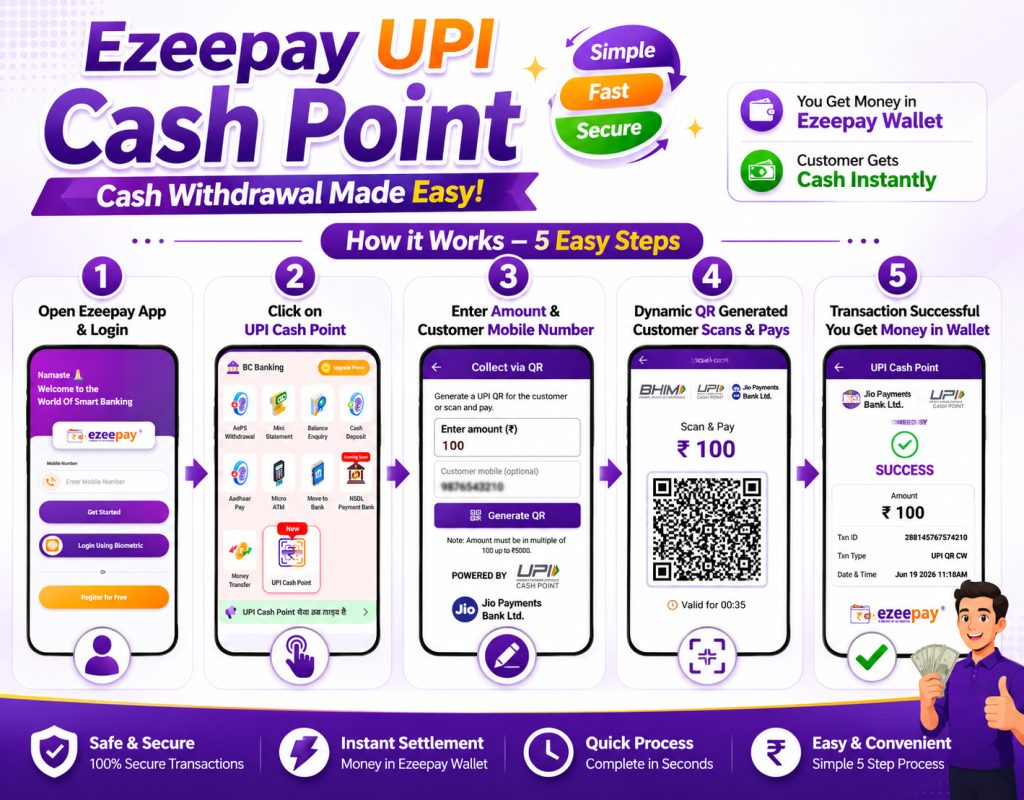
Step 1: Open the Ezeepay Application
Launch the Ezeepay app and log in using your registered mobile number.
Step 2: Select UPI Cash Point
From the dashboard, click on the UPI Cash Point option.
Step 3: Enter Amount and Customer Mobile Number
Enter the withdrawal amount requested by the customer.
You may also enter the customer’s mobile number for transaction tracking and record purposes.
Step 4: Generate Dynamic QR Code
Once the details are entered, the system generates a secure dynamic QR code.
The customer scans the QR code using their preferred UPI app and completes the payment.
Step 5: Transaction Successful
After successful payment:
- The transaction amount is credited to the retailer’s Ezeepay Wallet.
- The retailer provides the equivalent cash amount to the customer.
The entire process is fast, secure, and convenient.
Supported UPI Apps for UPI Cash Point
Customers can use various UPI-enabled applications to withdraw cash through Ezeepay Cash Point service, including:
- Google Pay
- Paytm
- BHIM UPI
- CRED
- WhatsApp Pay
- Navi
- Groww
- Jupiter
- PhonePe (subject to availability)
- SBI YONO
- HDFC Mobile Banking
- Kotak Mobile Banking
- Airtel Payments Bank App
- Jio Payments Bank App
- And other supported UPI-enabled applications
Supported apps may vary based on NPCI and banking partner guidelines.
Supported Banks for UPI Cash Point
Ezeepay Cash Point supports transactions from multiple leading banks, including:
- State Bank of India (SBI)
- HDFC Bank
- ICICI Bank
- Axis Bank
- Kotak Mahindra Bank
- YES Bank
- HSBC Bank
- Bank of India
- Punjab National Bank
- Union Bank of India
- Federal Bank
- IndusInd Bank
- IDFC First Bank
- Airtel Payments Bank
- Jio Payments Bank
The list of supported banks continues to expand as new banking partners are integrated.
Retailer Commission on UPI Cash Point
One of the biggest advantages of UPI Cash Point is the opportunity for retailers to earn additional income.
Normal Retailer
- Transactions above ₹3,000
- Earn up to ₹8 commission per eligible transaction
Prime Retailer
- Earn up to ₹10 commission per eligible transaction
Super Prime Retailer
- Earn between ₹10 and ₹12 commission per eligible transaction
Important Note
Commission structure may vary based on transaction volume, retailer category, company policy, and promotional offers.
Terms & Conditions Apply.
Do’s While Using UPI Cash Point
To ensure safe and successful transactions, retailers should:
✔ Verify the withdrawal amount before generating the QR code
✔ Confirm successful payment status
✔ Check wallet credit before handing over cash
✔ Maintain a stable internet connection
✔ Conduct transactions in front of the customer
✔ Keep sufficient cash available for withdrawals
Don’ts While Using UPI Cash Point
Avoid the following mistakes:
✘ Do not provide cash before payment confirmation
✘ Do not share QR screenshots publicly
✘ Do not process suspicious transactions
✘ Do not share OTPs or sensitive credentials
✘ Do not issue cash against failed transactions
✘ Do not rely solely on customer payment screenshots
How to Activate UPI Cash Point Service?
If this service is not available in your Ezeepay account, follow these steps:
Complete Your KYC
KYC verification is mandatory for activating UPI Cash Point services.
Watch the KYC Video
Ezeepay has provided a detailed KYC process tutorial on its official YouTube channel to help retailers complete verification quickly.
Contact Customer Support
If your KYC is complete and the service is still not activated, contact the Ezeepay Customer Care Team for assistance.
Why Choose Ezeepay UPI Cash Point?
Key Benefits
- Instant cash withdrawal
- Secure QR-based transactions
- Additional retailer income
- Simple user interface
- Fast wallet settlement
- Multiple bank support
- Compatible with major UPI apps
- Ideal for rural and urban markets
Frequently Asked Questions (FAQs)
Question:- What is UPI Cash Point?
Answer:- UPI Cash Point is a service that allows customers to receive cash by making a UPI payment through a dynamic QR code generated by the retailer.
Question:- Is ATM card required for UPI Cash Point withdrawal?
Answer:- No. Customers only need a UPI-enabled application and a linked bank account.
Question:- Where does the money go after payment?
Answer:- The amount is credited directly to the retailer’s Ezeepay Wallet.
Question:- Which UPI apps are supported?
Answer:- Google Pay, Paytm, BHIM, CRED, Navi, WhatsApp Pay, Groww, Jupiter, and several banking UPI apps are supported.
Question:- Is UPI Cash Point safe?
Answer:- Yes. Transactions are completed using secure UPI infrastructure and dynamic QR technology.
Question:- How much commission can retailers earn?
Answer:- Normal retailers can earn up to ₹8 on eligible transactions above ₹3,000, while Prime and Super Prime retailers can earn up to ₹10–₹12, subject to company policies.
Question:- How can I activate UPI Cash Point?
Answer:- Complete your KYC verification, watch the official KYC tutorial video, and contact customer support if activation issues persist.
Question:- Can customers withdraw cash without visiting an ATM?
Answer:- Yes. Customers can withdraw cash from participating Ezeepay retailers through UPI Cash Point.
Conclusion
Ezeepay this withdrawal service is revolutionizing cash accessibility by combining the convenience of UPI payments with instant cash withdrawal. It offers a secure, fast, and profitable solution for both customers and retailers. Whether you operate in urban markets or rural locations, It can help increase customer footfall while generating additional commission income.
If your UPI Cash Point service is not yet activated, complete your KYC today and start offering seamless cash withdrawal services through Ezeepay.